Alphaworld Enhanced
Developer: SW City Productions
Created by: SW Comit
Used in: Alphaworld in Activeworlds
 |  |
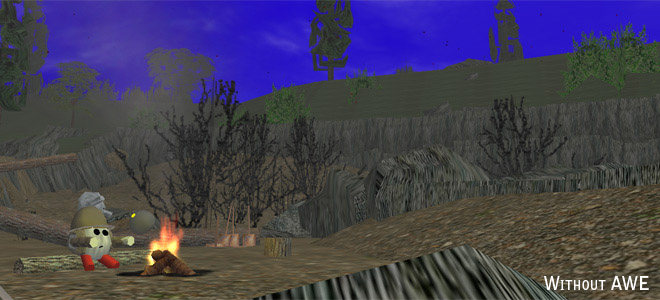
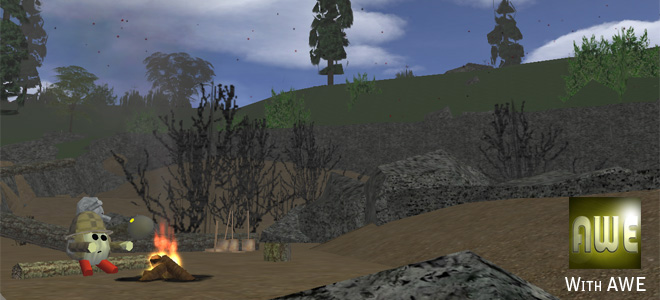
Alphaworld Enhanced (AWE) was an award-winning mod that utilized the "local path" option within the Activeworlds (AW) settings to modify the appearance of the Activeworlds world Alphaworld with higher resolution textures and also to add a few quality-of-life enhancements.
As of October 12, 2022, AWE has been deprecated. The 3D skybox and all textures and avatars from AWE have been integrated directly into the Virtual Paradise and DeltaWorlds versions of SW City. All textures have been integrated directly into the Activeworlds version as well.
Contents (hide)
topFeatures
- Texture Improvement: Hundreds of commonly used textures have been drastically enhanced; higher resolutions and seamless texturing let you see the world in a whole new light.
- Skybox: Replace Alphaworld's cartoony and unrealistic sky.
- Mute "Teleport" sounds: Mute the unnecessary sounds that play when you teleport and warp around the world.
- Bonus Avatars: Over a dozen bonus avatars available for use.
topAffected Elements
Textures
A list of textures that have been enhanced and what was specifically done.
| Texture name | Changes made |
| astrotrf | seamless, resolution 2x |
| av_skin9 | seamless, resolution 2x, compression artifacts removed |
| back3gnd | seamless, resolution 2x |
| boden | seamless, resolution 4x |
| carpet1 | seamless, resolution 2x |
| concrete | seamless, resolution 2x |
| concrete2 | seamless, resolution 2x |
| ctable2 | seamless, resolution 2x |
| dirt | resolution 1.6x |
| earthmap | new texture |
| fall_g | seamless, resolution 2x |
| fencea7m | more precise mask |
| flame1 | new texture |
| firep13 | seamless, resolution 2x |
| flat7 | original texture, 38% higher res, made slightly more seamless |
| flat8 | original texture, 50% higher res |
| flat9 | original texture, 38% higher res |
| flat10 | original texture, 38% higher res |
| flat11 | original texture, 38% higher res |
| flat16 | original texture, 38% higher res |
| flat17 | original texture, 50% higher res |
| flat18 | original texture, 38% higher res, slightly more seamless |
| flat19 | original texture, 38% higher res, slightly more seamless |
| flat20 | original texture, 38% higher res |
| frgrd-d | seamless |
| granite | seamless, resolution 4x |
| grass1 | seamless, resolution 2x |
| grasso | new texture |
| grassn | darker version of grasso |
| keyb | new texture |
| marble2 | seamless |
| road3 | resolution 2x |
| road4 | resolution 2x |
| road7 | resolution 2x |
| road11 | seamless |
| rock2 | resolution 2x |
| roof1 | seamless |
| sand1 | resolution 2x |
| sand2 | seamless, resolution 2x |
| slate1 | resolution 2x |
| snow1 | seamless, resolution 2x |
| stone4 | seamless |
| stone7 | seamless |
| stone8 | minor adjustment |
| stone11 | seamless, resolution 2x |
| stone12 | seamless |
| stone14 | seamless, resolution 2x |
| thbase1 | more seamless, resolution 2x |
| thwall1 | resolution 2x |
| tile1 | original texture, higher res, made seamless |
| tile8 | original texture, 38% higher res |
| tile9 | original texture, 38% higher res |
| tile14 | compression artifacts removed |
| tile15 | original texture, 38% higher res |
| tile16 | original texture, 38% higher res |
| tile21 | original texture, 38% higher res |
| tv4 | seamless, resolution 2x |
| topgrey | resolution 2x |
| walk1 | resolution 2x |
| wall8 | original texture, 15% higher res |
| wall9 | original texture, 58% higher res |
| wall10 | original texture, 38% higher res, made seamless |
| wall12 | original texture, 38% higher res, made seamless |
| wall13 | fixed tiling distortion |
| wall14 | fixed tiling distortion |
| vinceil | seamless, resolution 2x |
| xluc1 | 4x frames for smoother effect |
Objects
A list of modified objects and what was done, and how to take advantage of the changes.
| Object name | Changes made |
| ground1 | collision fixed |
| landb - landg | textures less distorted |
| pot3 | accepts textures and pictures |
| tbtree002, 4 and 5 | tagged |
| tree01 - 03 | tagged |
| xchpa1ws | accepts textures and pictures |
topCustom Content Usage Guidelines
AWE includes some custom content that cannot be seen by non-AWE users. Below are recommended guidelines to lessen the visual difference between the two users.
- Tagged trees: The following trees accept the tag command: tree01, tree02, tree03, tbtree002 tbtree004, tbtree005 Using the tag command you can texture the trunk and/or the leaves separately. Non-AWE users will see the default tree, so try not to make your custom tagged tree dramatically different. Tag 1 is the trunk. Tag 2 is the leaves. To tag both you have to use a combination of the texture and animate command, like this: create texture ____ tag=2,animate tag=1 me ____. 1 1 0
- AWE Flame1 and 2 textures: These are the same as the flame1 texture except they're rearranged so that they are out of sync with the other flames. This way if you create multiple flames, you can mix up the flame textures to make it look more realistic. However, only use it on the flame1 object so that non-AWE users will just see the default flame.
- Other additional AWE textures: If you plan on using these, place them on objects with default textures that are somewhat similar to the custom AWE texture. Non-AWE users will see the default texture.
- Pot3 and Xchpa1ws accept textures and pictures now: If you apply a texture, non-AWE users will see the object incorrectly. It's recommended you use the create color command, followed by the picture command for the desired texture. For example: create color brown,picture objects.activeworlds.com/aw/textures/wood1.jpg Non-AWE users will see the brown color, and AWE users will see the wood1 texture.
topRelease Notes
A history log of AWE releases.
New in version 1.4.065-066
- Build 67 has the option to shrink harold by 3%, hotep by 2%, and birde by 8%. This should allow them to walk into tight places that they could once do in AW 3.6, but no longer in AW 4.1.
- Build 66a removes the grabber tool as its usefulness has been mostly lost by version 1.4. Installer also cleaned up a bit.
- Build 66 adds option to install AWE without autolook enabled avatars.
- Tbtree010 no longer shows "halo lines" at the top of its sprite polygons.
- Endwave commands removed from avatars.dat due to being obsolete. Thanks Byte.
- The flower and tree sprite objects (29 in total) no longer do texture clamping. This will fix texture distorting artifacts you may notice if you apply the object's respective texture & mask on 3d objects.
- AWE avatars updated for AW 4.1. They now support the autolook function and avatar menus. They've also been given new gestures now that excess gestures are displayed in a drop-down menu instead of going off the screen.
- Texture rusgrd-n and rusgrd-d enhanced (2x resolution, seamless).
- The following objects (1,532+ models) had all unnecessary code stripped out and optimized for improved performance:
tree0_
tbtree__
rock__
edge__
sign__
arch__
street__
wall___
walk___
road___
p___ (panel objects)
g___ (gfence, gbed, etc)
12 avatars (+ todd's dead hand revived)
plus dozens of various small detailing objects.
New in version 1.3.061
- Added the tropical sprite pack: awe_shrub1, 1 through 12. Only place these textures on other sprites, such as palms as shrubs. Non-AWE users will see the sprite you put the texture on.
- Texture phone1 adjusted to help prevent texture distortion on phone object's side.
- Texture av_shirt9 enhanced (resolution 2x, fixed compression artifacts)
- Texture xluc1 enhanced (8 frames now instead of 2 for smoother glow)
- Texture tile14 enhanced (fixed compression artifacts)
- Texture keyb enhanced (brand new texture, 2x resolution)
- Texture tbbark02 and tbbark02a enhanced (seamless, goes with enhanced tbtree objects)
- Tbtree00#.rwx fixes and additions:
- 3 and 7 now added and tagged, but the leaves are tag 200 instead of 2 so that it can also accept pictures. May proof useful with masked gif support in AW 4.1.
- Debugged the script on 2, 3, 4, 5 and 7 so that it accepts animate me commands.
- Remapped the trunks on 2, 4 and 7 to remove massive distortion.
- Mask fencea7m enhanced (chain link fence mask - cleaner, more precise)
- Remapped the top of inward turning land objects (landc and landf) to unify the texturing with landa.
- Ground object fixed so that you walk along it, vs hovering above it like before.
- Comp1 has been enhanced and can further enhanced. Add "create texture awe_comp2 tag=1" to a comp1 object to add realistic mesh vents to the back. The top rim also accepts signs suitable for "branding". The matching background sign color is "D9CCB3".
- The phone object (xaw49.rwx) now accepts pictures so you can change the phone style. A few starter textures are available: pics.swcity.net/phone1.jpg 1 through 5.
- Objects wins1, wins2, winb1 and winb2 have had their frames tagged. To give them a wood frame use "texture wood3 tag=1" for example. The glass also accepts pictures suitable for stained glass pictures.
- Objects pict1 1 through 6, and xpict1 1 through 3 remapped. The picture frame no longer distorts textures.
- Streetlight objects (stlamp1.rwx and stlmpt00.rwx) double sided now so it doesn't appear invisible when looking through its glass.
- Object xaw18 (sailboat) tagged so you can texture the boat without changing the sails. Example: "create texture wood7 tag=1".
New in version 1.2.044
- 1.2.044 patch fixes a cache clearing issue with the flame masks.
- Skybox added. Includes textures "awe_skybox1_front", back, right, left, up, and down.
- Pot3 and xchpa1ws objects now accept texture and picture commands.
- New 'Formal Harold' and 'Formal Hotep' avatar (by Gnu32)
- Texture road3 enhanced (resolution 2x)
- Texture road4 enhanced (resolution 2x)
- Texture stone11 enhanced (resolution 2x, seamless)
- Texture ctable2 enhanced (resolution 2x, seamless)
- Texture stone12 reworked using better methods than before
- Texture flame1 enhanced (brand new texture, more realistic looking)
- Texture back3gnd enhanced (resolution 2x, seamless)
- Texture wtcmem2 enhanced (resolution 4x)
- Texture tv4 enhanced (resolution 2x, seamless)
- Texture firep13 enhanced (resolution 2x, seamless)
- Texture carpet1 enhanced (resolution 2x, seamless)
- Texture wall13 and wall14 fixed. The original version was tiled terribly, showing major distortion in the center.
- All coronas have been doubled in resolution to avoid pixelation when larger than 128 size.
- Two additional textures added: awe_flame1 and awe_flame2. Use these two plus flame1 to create flames that are out of sync with each other, which looks more realistic. Only place it on a flame1.rwx object so non-AWE users will just see the default flame.
- The following AWE textures were being downsized by the AW browser, resulting in a loss of texture quality. This is been fixed:
tile1
tile8
tile9
tile15
tile16
tile21
wall8
wall10
wall12 (also adjusted to be seamless)
flat7
flat9
flat10
flat11
flat16
flat17
flat18
flat19
flat20
grasso
grassn
dirt
New in version 1.1.031
- Larger ground object (4x larger, blue backdrop not seen untill roughly 32% higher elevation vs before)
- New version of grass1 (more seamless)
- Better jump sequence (your legs actually move in this one)
- Added a fall sequence, which activates when your falling.
- Some of the tbtree___ objects, and the old tree01 to 03 objects, support the tag command so you can texture the trunk and leaves specifically. Tag 1 is the trunk, tag 2 is the leaves. Non-AWE users will *ee the default tree. It's suggested you don't dramatically change the appearance of the trees, for the sake of non-AWE users. Expect the rest of the trees to be taggable in a later version. Thanks RoadKill & Selanit.
- Texture slate1 enhanced (resolution 2x)
- Texture sand1 enhanced (resolution 2x)
- Texture sand2 enhanced (resolution 2x, seamless)
- The flat8 in version 1.0 was enhanced incorrectly. It is now properly enhanced (original texture, 74% higher resolution)
- grassn now has proper darkness ratio towards grasso so that the two should match up.
- Texture rock2 enhanced (resolution 2x)
- Texture road7 enhanced (resolution 2x)
- Texture boden further enhanced (resolution 4x, version 1.0 had 2x).
- Texture roof1 fixed - there was an unsightly black line on the side in the vanilla version.
- Texture thwall1 enhanced (resolution 2x)
- AWE now comes bundled with a tool that downloads the entire AW object path (except content modified by AWE) into the AWE folders, so you never have to download it again in the future. Thanks Selanit. To use it, look in the start menu. Note this will take a long time, especially for dial-up users.
New in version 1.0.020
- wall8 added (original texture, 15% higher res)
- walk1 added (resolution 2x)
- vineceil made 10% darker to be more like the original
- flat18 added (original texture, 38% higher res, slightly more seamless)
- flat19 added (original texture, 38% higher res, slightly more seamless)
- flat20 added (original texture, 38% higher res)
- the | which divides AW and AWE gestures shouldn't display an error anymore
- wall9 added (original texture, 58% higher res)
New in version 1.0.015
- Jump gesture linked to the jump key (like how it is in most worlds). The run gesture was also added to running, but later removed due to it not working very well with AW's avatars.
- The avatars expansion pack installs better now, and you won't lose it if AW crashes.
- The muted teleport and warp sounds were not working all the time, similar to the problem the avatar pack was having. This should now be fixed.
- New version of the concrete texture.
- New version of the road11 texture.
- concrete2 added to the pack. Made seamless and resolution x2.
- All avatars now have the sit gesture (>_< @ AWI never adding that to begin with)
- marble2 added to the pack. Carefully made seamless, while keeping the original look.
- You can now customize the content to install. Thanks Sel.
New in version 1.0.009
- The new stone2 texture was removed
- The warp and teleport sound effects have been silenced due to popular demand. This should allow for more immersive sounds when warp and teleport are used within a game or immersive environment.
- The Avatar Bonus Pack has been integrated with AWE, which includes 12 more avatars and additional gestures to most existing avatars.
- texture frgrd-d made seemless
- installer now has an AWE logo
- new astrotrf made by Bastilion to look more like the original astrotrf yet be seamless.
- new vinceil texture made. Should look more like the original, and not blury this time.
1.0.00x
- Initial release. Contains 20-30 textures made and tested in 0.0.0xx beta builds.
- Uses an installer to simplify use.
topTroubleshooting
Having a problem with AWE? Check here for help.
Problem: I installed AWE but nothing changed.
Problem: I'm unable to step up onto some stairs/steps now.
Problem: AWE lags my computer too much.
Problem: The ground object has problems like shifting around and z-buffering.
Problem: Not everything is as it should be after installing or uninstall a specialized mod for AWE, such as winter mode.
Problem: I lost my AWE avatars, or I lost my muted teleport sounds.
Problem: My problem wasn't listed here!